Cluster deployment instructions
Cluster Mode Deployment
This Quick Start Manual is to help you quickly download, install and use Nacos on your computer to deploy the cluster mode for production use.
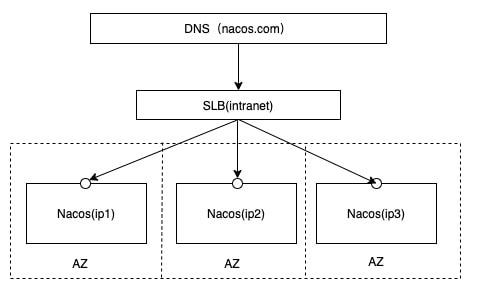
Cluster Deployment Architecture
Therefore, when it is open source, it is recommended that users put all server lists under a vip and then hang under a domain name.
Http://ip1:port/openAPI Directly connected to ip mode, the machine needs to be modified to use ip.
Http://SLB:port/openAPI Mount the SLB mode(Intranet, do not expose internet to avoid security risks), directly connect to SLB, the following server ip real ip, readability is not good.
Http://nacos.com:port/openAPI Domain name + SLB mode(Intranet, do not expose internet to avoid security risks), good readability, and easy to change ip, recommended mode
1. Preparing for the Environment
Make sure that it is installed and used in the environment:
- 64 bit OS Linux/Unix/Mac, recommended Linux system.
- 64 bit JDK 1.8+; Download. Configuration.
- Maven 3.2.x+; Download. Configuration.
- 3 or more Nacos Nodes;
2. Download source code or installation package
You can get Nacos in two ways.
Download source code from Github
unzip nacos-source.zip
cd nacos/
mvn -Prelease-nacos clean install -U
cd nacos/distribution/target/nacos-server-1.3.0/nacos/bin
Download Compressed Packet after Compilation
Download address
  unzip nacos-server-1.3.0.zip or tar -xvf nacos-server-1.3.0.tar.gz
  cd nacos/bin
3. Configuration Cluster Profile
In the Nacos decompression directory Nacos / conf directory, there is a configuration file cluster. conf, please configure each line as ip: port.
# ip:port
200.8.9.16:8848
200.8.9.17:8848
200.8.9.18:8848
4. Determine The DataSource
Using built-in data sources
No configuration is required
Use an external data source
production and use recommendations at least backup mode, or high availability database.
Initializes the MySQL database
application. properties configuration
application.properties configuration file
5. start server
Linux/Unix/Mac
Standalone mode
sh startup.sh -m standalone
Cluster mode
Using built-in data sources
sh startup.sh -p embedded
Use an external data source
sh startup.sh
6. Service Registration & Discovery and Configuration Management
Service registration
curl -X PUT 'http://127.0.0.1:8848/nacos/v1/ns/instance?serviceName=nacos.naming.serviceName&ip=20.18.7.10&port=8080'
Service discovery
curl -X GET 'http://127.0.0.1:8848/nacos/v1/ns/instance/list?serviceName=nacos.naming.serviceName'
Publish configuration
curl -X POST "http://127.0.0.1:8848/nacos/v1/cs/configs?dataId=nacos.cfg.dataId&group=test&content=helloWorld"
get configuration
curl -X GET "http://127.0.0.1:8848/nacos/v1/cs/configs?dataId=nacos.cfg.dataId&group=test"
7. shut down server
Linux/Unix/Mac
sh shutdown.sh