
Multiple data sources
Multi-DataSource Plugin
Starting from version 2.2.0, Nacos supports the injection of multi-datasource implementation plugins via the SPI (Service Provider Interface) mechanism. By including the corresponding datasource implementation, users can select and load the desired plugin at startup by configuring the spring.datasource.platform property in the application.properties file.
This document provides a detailed guide on how to implement a multi-datasource plugin and how to enable it.
Note: The multi-datasource plugin feature is currently in the Beta stage. API and interface definitions may undergo significant changes in future updates. Please ensure your plugin is compatible with your specific Nacos version.
Architecture Evolution
Original Implementation
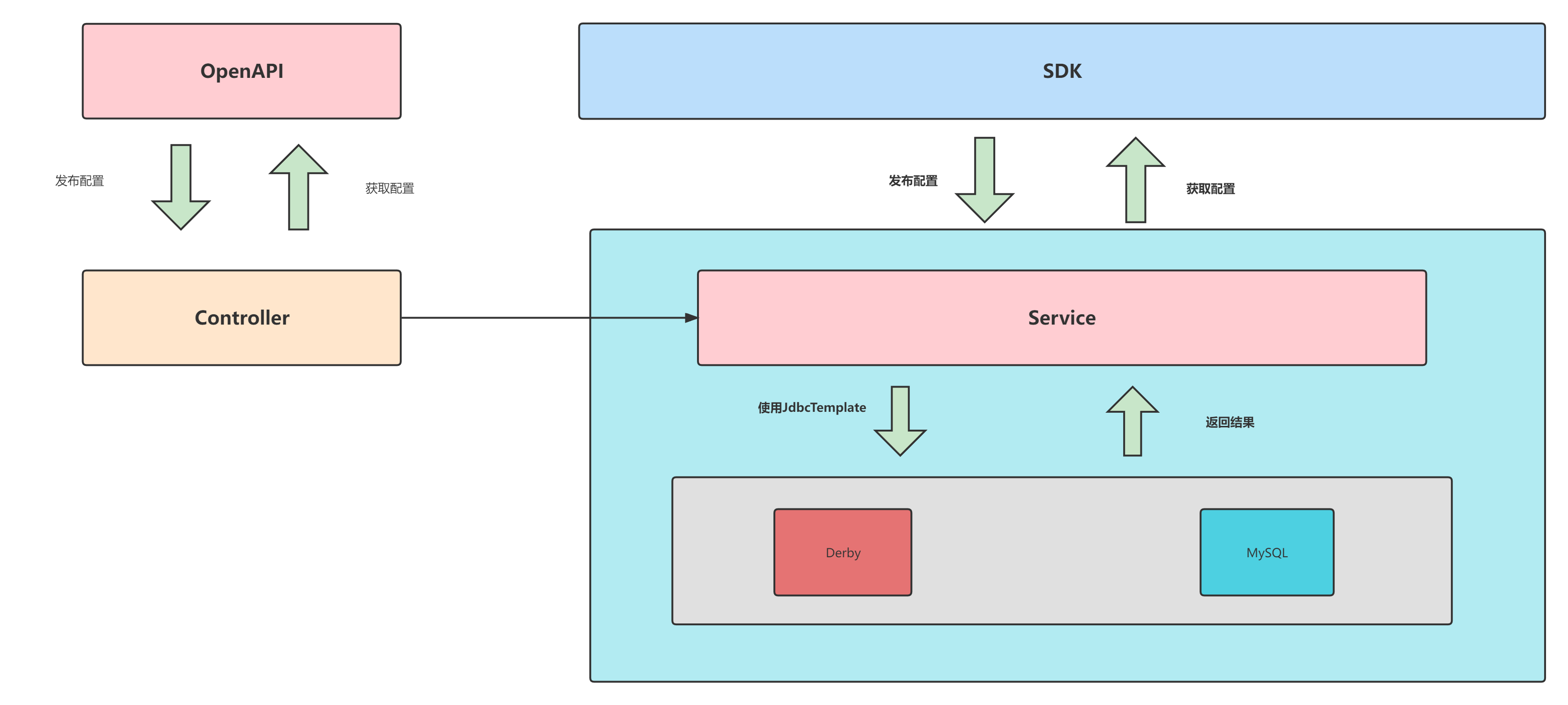
In the legacy Config module, all SQL operations were executed by using JdbcTemplate with hardcoded SQL statements. This resulted in high coupling between SQL logic and business logic, with support limited strictly to Derby and MySQL.
Plugin-based Implementation
The current multi-datasource plugin utilizes the SPI mechanism to abstract SQL operations into multiple Mapper interfaces based on database tables. Implementations of these interfaces are then written to accommodate the SQL dialects of different databases.
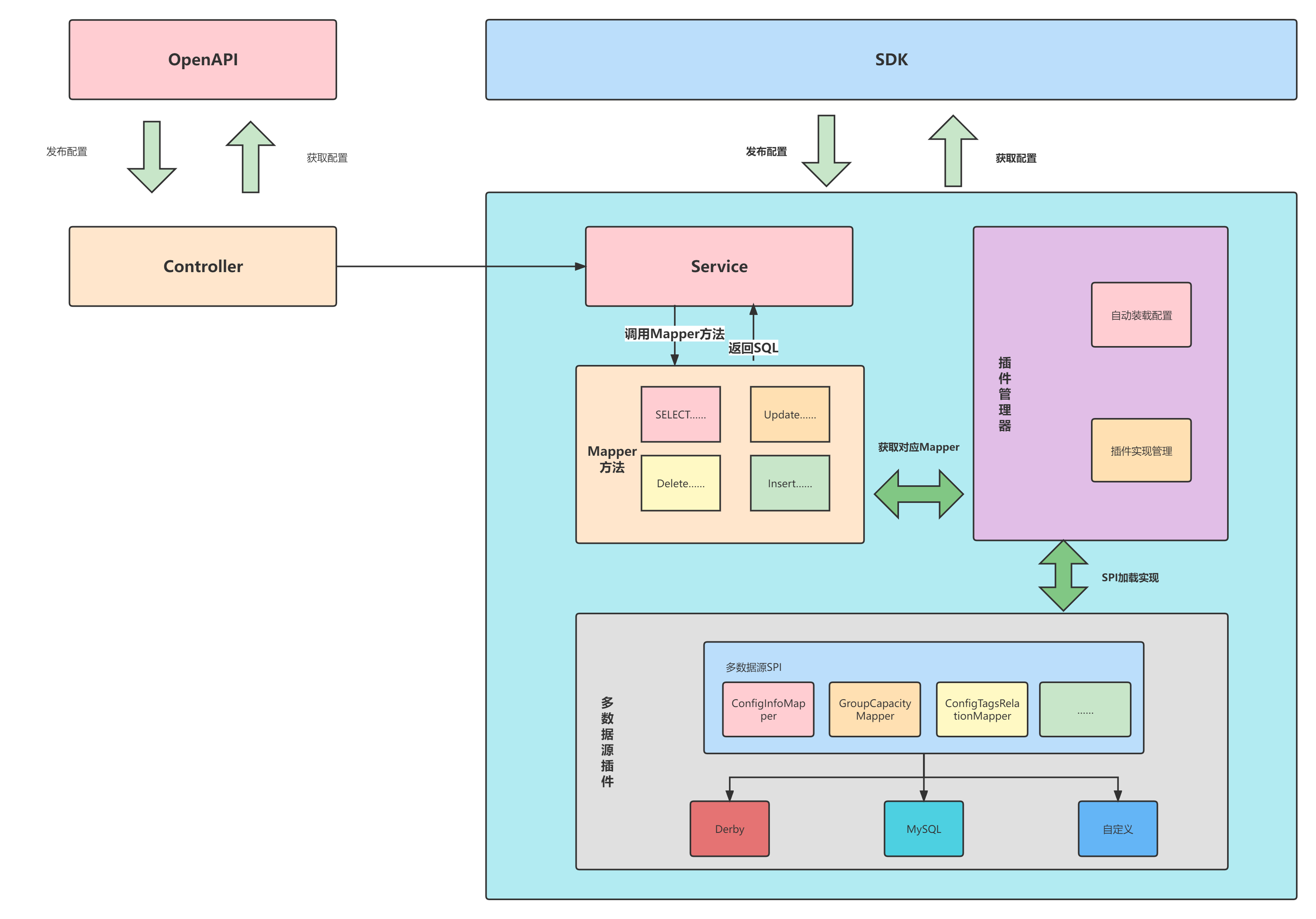
Nacos provides default Mapper implementations for Derby and MySQL. Support for other databases requires users to load them via the datasource plugin.
How to Use
-
Check Support: Verify if Nacos currently supports your required datasource. Nacos provides Derby and MySQL implementations by default. If your database is not supported, refer to the “Developer Guide” below to develop or contribute a plugin.
-
Configuration: * Set
spring.datasource.platformto the name of your specific datasource inapplication.properties.- Configure
db.pool.config.driverClassNamewith the appropriate database driver. - Configure the remaining datasource connection parameters.
- Configure
-
Build and Run: Compile and run Nacos to enable the new datasource.
-
Deployment: Place the compiled plugin JAR into the
pluginsdirectory under the Nacos root folder. Nacos will load it automatically at startup. (If using a different directory, append the path to the startup command:-Dloader.path={TARGET_PATH}).
Developer Guide: How to Develop a Plugin
-
Dependency: Add the
nacos-datasource-plugindependency to your project. -
Implement Mappers: Implement the specific SQL methods within the Mapper interfaces located in the
com.alibaba.nacos.plugin.datasource.mapperpackage. This primarily involves handling dialect differences such as pagination. You can refer to the existing Derby and MySQL implementations incom.alibaba.nacos.plugin.datasource.impl.
Table-to-Mapper Mapping Reference:
| Database Table | Mapper Interface |
|---|---|
| config_info_aggr | ConfigInfoAggrMapper |
| config_info_beta | ConfigInfoBetaMapper |
| config_info_gray | ConfigInfoGrayMapper |
| config_info | ConfigInfoMapper |
| config_info_tag | ConfigInfoTagMapper |
| config_tags_relation | ConfigTagsRelationMapper |
| group_capacity | GroupCapacityMapper |
| his_config_info | HistoryConfigInfoMapper |
- SPI Configuration: Create an SPI configuration file named
com.alibaba.nacos.plugin.datasource.mapper.Mapper. List your implementation classes within this file (refer to the config module’s Derby/MySQL SPI files for examples). - Integration: Users can now achieve database-specific operations by depending on this plugin.
- Compile: Build the project.
Compilation
Before compiling the plugin, you must compile nacos and install it to your local Maven repository.
-
git clone git@github.com:alibaba/nacos.git -
cd nacos && mvn -B clean package install -Dmaven.test.skip=trueNote: If the
revisionvariable fails to resolve, please update Maven to the latest version. -
git clone {Your Datasource Plugin Git URL} -
mvn install
Recommendation: Upload the compiled artifact to your organization’s internal Maven repository.
Roadmap
Future updates will focus on:
-
Further refining SQL statements to reduce redundancy and improve compatibility with dynamic SQL.
-
Extracting difference lists between various datasources and allowing replacement via configuration files or classes to simplify plugin development.
Other Implementations
For implementations of other datasources (e.g., PostgreSQL, Oracle, etc.), please refer to the official nacos-plugin repository:
- Repository Address: https://github.com/nacos-group/nacos-plugin