
AI Registry Overview
AI Registry is the Nacos 3.x capability for registering, governing, discovering, and distributing AI resources. It sits beside configuration management and service discovery as a core Nacos capability.
In a microservice system, Nacos helps applications find services, read configuration, and react to changes. In an AI application, the application also needs to find Skills, Agents, MCP Servers, Prompts, AgentSpecs, and other AI resources. AI Registry provides the place where these resources enter the platform, get governed, are published by version, and are discovered at runtime.
AI Registry Panorama
An AI application usually goes through resource creation, publishing, runtime discovery, and ongoing governance. Nacos AI Registry puts these resources into a shared namespace, version, and permission model.
| Scenario | Resource managed by Nacos | Runtime usage | Governance focus |
|---|---|---|---|
| Skill | Skill packages, SkillCards, versions, and labels | Agents or toolchains download by name, version, or label | Package source, review, visibility, and distribution scope |
| Agent | Catalog metadata, versioned call definitions (including A2A AgentCards), and runtime endpoints | Applications search, discover and subscribe through RAD, then call Agents using their protocols | Lifecycle, endpoints, versions, external providers, and visibility |
| MCP Server | MCP server metadata, tools, resources, endpoints, and versions | MCP clients, MCP Router, gateways, or Agents discover and call tools | Protocols, endpoints, tool switches, import, and proxy |
| Prompt | Prompt templates, variables, versions, and labels | Applications read templates by Prompt key, version, or label | Review, rollback, latest labels, and canary usage |
| AgentSpec | Agent specification packages, manifests, content, and resources | Agent platforms, developer tools, or AI applications load specification packages | Package integrity, versions, labels, and public scope |
All these resources are isolated by namespace. Teams can use namespaces for environments, tenants, or business domains.
Skill Registry
Skill Registry manages reusable AI capability packages. A Skill can describe its name, inputs and outputs, dependent resources, versions, and visibility. Platform teams can package common capabilities as Skills, while developers or Agent runtimes fetch them by name, version, or label.
Common use cases include:
- Package internal tools, automation flows, or model capabilities as distributable Skills.
- Use draft, review, publish, online, and offline states to control production availability.
- Use business tags, version labels, and visibility scope to manage who can use a Skill.
- Download Skill ZIP packages through client APIs for runtimes or developer tools.
See Skill Registry for details.
Agent Registry
Agent management in Nacos 3.3 brings together catalog metadata, versioned call definitions and runtime endpoints, with search, discovery and subscriptions through RAD (Remote Agent Discovery). A2A remains a compatible integration, with AgentCard retained as the native descriptor of an A2A call interface.
Agents can come from different sources. Spring AI Alibaba applications can auto-register Agents. Custom Agents can be published through SDKs or APIs. Agents from external providers can also be imported and governed in one place. Platform teams can manage Agent versions, endpoints, and visibility in a consistent way.
Agent Registry focuses on callable Agent entries. AgentSpecs Registry focuses on Agent specification packages. They can work together, but they are not the same resource.
See Agent Management for management and publishing, and the RAD Integration Guide for a complete application example.
MCP Registry
MCP Registry is one of the most common AI Registry integration scenarios. It gives MCP Servers, existing APIs, external tool services, and AI applications a unified registration and discovery entry point.
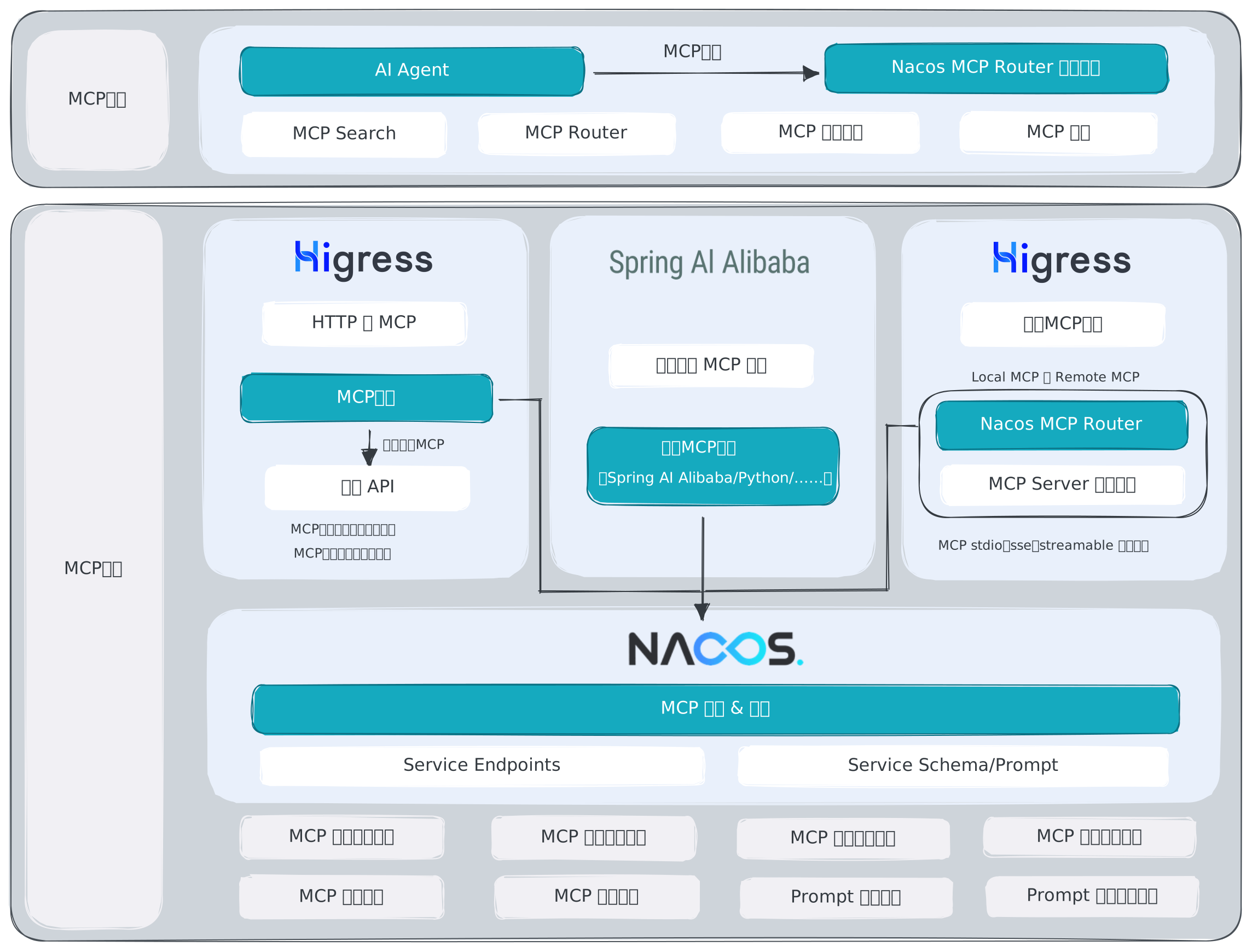
Nacos can manage MCP Server metadata, tools, resources, endpoints, versions, and protocol exposure. New MCP Servers can auto-register into Nacos. Existing HTTP or RPC services can be declared and converted into MCP tools with gateway support. MCP Servers from external providers can also be imported and governed in one place.
Common MCP Registry paths include:
- A new MCP Server auto-registers into Nacos and is discovered by MCP clients or Agents at runtime.
- An existing API is converted into an MCP Server through server, tool, and endpoint declarations.
- Nacos MCP Router discovers MCP Servers in Nacos and exposes routing or proxy capabilities to clients.
- Dify, Higress, Spring AI Alibaba, and other ecosystem components read MCP Server information from Nacos.
Start with MCP Registry for version publishing and governance. For integration, see MCP Server Auto Registration and Discovery, Convert Existing APIs To MCP, Nacos MCP Router, and Dify Discovers Nacos MCP Server for details.
Prompt Registry
Prompt Registry manages prompt templates. It is useful when you want to move prompts out of application code and manage their versions, variables, labels, and release states in a platform.
Common usage includes:
- Manage template content and variable descriptions by Prompt key.
- Keep each prompt change as a version for audit and rollback.
- Use labels such as
latest,stable, orcanaryto control the version read by applications. - Query prompts through client APIs when an application starts or while it is running.
See Prompt Registry for details.
AgentSpecs Registry
AgentSpecs Registry manages Agent specification packages and their metadata. An AgentSpec usually contains manifest information, descriptive content, and related resource files. It is useful for distributing standardized Agent descriptions to Agent platforms, developer tools, and AI applications.
Nacos supports AgentSpec ZIP upload, draft creation, draft update, submit, publish, force publish, redraft, online, offline, labels, business tags, visibility scope, and version metadata query. At runtime, client APIs can get an AgentSpec by name, version, or label, and can also search available AgentSpecs with pagination.
See AgentSpecs Registry for details.
ARD Resource Discovery
Nacos 3.3 supports searching Agents, Skills, Prompts, and MCP Servers through ARD (Agentic Resource Discovery), with catalogs and versioned artifacts. AI applications and toolchains that support ARD can use this interface while resources continue to be published through their existing management entry points.
See ARD Resource Discovery for resource coverage, publishing requirements, and result usage. For server setup and HTTP examples, see the ARD Integration Guide in Ecology.
To add vector retrieval to ARD search, configure an optional vector index as described in AI Vector Plugin.
Relationship With Config And Naming
AI Registry is not just configuration management with another name. It is also not ordinary service discovery.
Configuration management focuses on publishing, querying, listening to, and auditing configuration content. Service discovery focuses on services, instances, health state, and subscription push. AI Registry focuses on AI resource models, versions, lifecycle states, visibility, and runtime discovery.
Use the corresponding AI management entry points for version changes, publishing, and discovery. Verify the availability of running instances and endpoints separately.
Common Paths
If you build AI applications:
- To download and use reusable capability packages, start with Skill Registry and Client API.
- To manage or publish Agents, start with Agent Management. For application endpoint registration, discovery and subscriptions, see the RAD Integration Guide.
- To discover and call MCP Servers, start with MCP Server Auto Registration and Discovery and Nacos MCP Router.
- To expose existing HTTP or RPC APIs as MCP tools, start with Convert Existing APIs To MCP.
- To query Prompts from applications, start with Prompt Registry and Client API.
- To distribute or load Agent specification packages, start with AgentSpecs Registry and Client API.
If you operate a platform:
- To govern Agent, MCP Server, Prompt, Skill, and AgentSpec versions, start with AI Resource Lifecycle.
- To create, review, and publish resources in the UI, see the Console Manual. For automated management or external resource import, use Admin API and Maintainer SDK.
- To add release checks, security scans, or external resource import, start with AI Publish Pipeline Plugin, AI Resource Import Plugin, and Visibility Plugin.
Resource Lifecycle
Nacos introduced AI resource lifecycle management in 3.2. In 3.3, it covers Agent, MCP Server, Prompt, Skill, and AgentSpec.
create draft -> edit -> submit -> review completed (reviewed) -> publish as online after approvalReview runs only when an enabled Pipeline node supports the resource type; otherwise submission publishes directly. Both approval and rejection move the version to reviewed. To edit after rejection, redraft it first. Publishing makes the version online, and the server automatically manages latest.
Resource enablement and version online/offline states are managed separately. MCP Servers and Agents also need usable service addresses or runtime endpoints. Publishing a definition does not mean its running instances are ready.
For states, force publish, and compatibility rules, see AI Resource Lifecycle.
Reading Suggestions
- Read this page to understand what AI Registry manages.
- Choose the Skill, Agent, MCP, Prompt, or AgentSpecs guide for your resource type.
- Read AI Resource Lifecycle to understand versions and states.
- Use the API, SDK, or console manual when you are ready to integrate.